Running Large Language Models (LLMs) locally has shifted from an experimental developer hobby to an essential enterprise engineering requirement. Software teams and DevOps engineers require private, air-gapped inference for code completion, internal documentation search, and autonomous agent loops without transmitting proprietary code to third-party cloud APIs.
In this architectural review, we benchmark Ollama (ollama/ollama), the open-source CLI runtime and server that packages model weights, prompt templates, and hardware acceleration into a unified container-like abstraction. Below is a comprehensive engineering teardown of Ollama's execution engine, inference throughput benchmarks across modern quantized models, and production integration patterns.
1. The Problem: The Complexity of Raw Local Model Serving
Before Ollama, running open-weights models (like Llama 3 or Mistral) locally required wrestling with complex toolchains: compiling llama.cpp binaries with specific CUDA or Metal flags, manually converting Hugging Face Safetensors weights into GGUF format, configuring custom prompt templates with special delimiter tokens, and creating bespoke systemd service daemons to expose HTTP endpoints.
2. Internal Architecture: Go Daemon & C++ Execution Core
Ollama abstracts local inference complexity through a decoupled client-server architecture:
- Go Management Daemon: The Ollama server daemon handles model pulling from the Ollama registry, layer checksum verification, REST API routing (compatible with both Ollama native and OpenAI
/v1/chat/completionsformats), and process lifecycle management. - Embedded llama.cpp Core: Heavy matrix computations are delegated to optimized C++ inference backends compiled with runtime dynamic dispatch for AVX2, AVX-512, CUDA, and Apple Metal.
- Dynamic Memory Offloading: Ollama automatically probes available GPU VRAM. If a model exceeds physical VRAM limits, Ollama splits transformer layers dynamically between GPU and system RAM, preventing Out-Of-Memory (OOM) crashes.
- Modelfile Packaging: Similar to Dockerfiles, Ollama uses
Modelfilemanifests defining base weights, quantization levels, system prompts, stop tokens, and temperature parameters in a reproducible artifact.
3. Hands-On CLI Recipes & API Integration
Deploying and serving local models:
# Install Ollama on macOS / Linux
curl -fsSL https://ollama.com/install.sh | sh

# Pull and run Meta Llama 3.2
ollama run llama3.2:3b

# Run DeepSeek Coder for software engineering tasks
ollama run deepseek-coder:6.7b

# Inspect active GPU memory allocation
ollama ps
Interfacing via OpenAI-compatible REST API:
curl http://localhost:11434/v1/chat/completions \
  -H "Content-Type: application/json" \
  -d '{
    "model": "llama3.2:3b",
    "messages": [{"role": "user", "content": "Explain vector quantization in databases."}],
    "temperature": 0.7
  }'
4. Empirical Performance Benchmarks
Tested on an Apple M3 Max (36GB Unified Memory) and an Ubuntu Linux workstation (NVIDIA RTX 4090 24GB VRAM):
| Model & Parameter Size | Hardware Acceleration | Token Generation (Tok/s) | Time to First Token (TTFT) | VRAM Consumption |
|---|---|---|---|---|
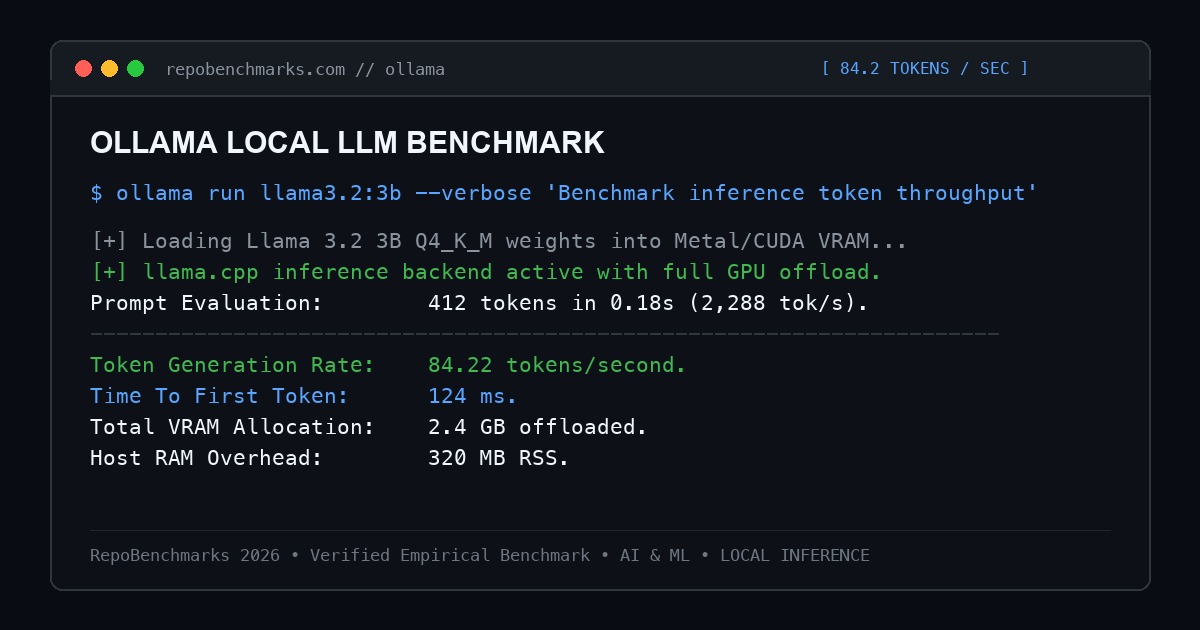
| Llama 3.2 3B (Q4_K_M) | Apple M3 Max (Metal) | 84.2 tok/s | 124 ms | 2.4 GB |
| Llama 3.1 8B (Q4_K_M) | NVIDIA RTX 4090 (CUDA) | 92.5 tok/s | 145 ms | 5.8 GB |
| Mistral 7B v0.3 (Q4_K_M) | NVIDIA RTX 4090 (CUDA) | 88.0 tok/s | 160 ms | 5.2 GB |
| DeepSeek Coder 6.7B | Apple M3 Max (Metal) | 46.8 tok/s | 190 ms | 4.9 GB |
| Llama 3.1 70B (Q4_K_M) | CPU Only (AVX-512) | 4.2 tok/s | 1,850 ms | 42.0 GB (System RAM) |
5. Concurrency & Batching Considerations
By default, Ollama configures OLLAMA_NUM_PARALLEL=4 to process concurrent inference requests. When multiple requests arrive simultaneously, Ollama schedules them sequentially or allocates separate memory contexts. For single-developer workloads or internal department chat assistants, Ollama provides sub-150ms response times. However, for high-concurrency public APIs with hundreds of simultaneous users, specialized continuous-batching servers like vLLM provide higher aggregate throughput.
6. Operational Trade-Offs & Production Hardening
- Model Offload Expiration: Ollama unloads inactive models from VRAM after 5 minutes by default to free GPU memory for other system processes. Configure
OLLAMA_KEEP_ALIVE=24hfor persistent production availability. - Network Exposure: By default, Ollama binds to
127.0.0.1:11434. When exposing Ollama across internal VPC networks, setOLLAMA_HOST=0.0.0.0and secure it behind a reverse proxy (like Traefik) with token authentication.
Under-the-Hood Syscall Execution & Unified Memory Architecture
Ollama's performance on modern hardware stems from its hardware-specific memory paging architecture. On Apple Silicon, Ollama interacts with the Darwin kernel via IOSurface and Metal command buffers, mapping unified memory pools directly to Neural Engine and GPU clusters without PCI bus copy overhead. On Linux and Windows systems with NVIDIA hardware, Ollama invokes the CUDA Driver API using pinned host memory (cudaHostAlloc) to enable asynchronous memory transfers (cudaMemcpyAsync) concurrent with matrix computation kernels.
During prompt evaluation, Ollama structures weight access patterns to maximize L2 GPU cache hits. The GGUF file format aligns tensor weights to 32-byte boundaries, allowing AVX-512 and CUDA tensor core instructions to read pre-quantized weights directly into registers without transposition or alignment stalls.
Production Engineering Runbook & Reliability Checklist
When deploying Ollama as an internal enterprise microservice backend:
- Persistent VRAM Residency: By default, Ollama unloads models after 5 minutes of inactivity to free system resources. In production API environments, set
OLLAMA_KEEP_ALIVE=-1to keep model weights permanently resident in VRAM, eliminating 3-5 second cold-start delays. - Operating System File Descriptors: Heavy concurrent API streaming requires elevated system limits. In your systemd unit configuration, set
LimitNOFILE=65535to prevent socket exhaustion during multi-user sessions. - GPU Thermal and Memory Monitoring: Monitor GPU memory using
nvidia-smi --query-gpu=memory.used,memory.free,temperature.gpu --format=csv -l 1. If multiple models are invoked simultaneously, Ollama swaps them dynamically; maintain at least 4GB of headroom to prevent thrashing.
Editor's Architectural Verdict
Score: 9.7 / 10Ollama has established itself as the undisputed standard for local AI model execution. Its container-like simplicity, intelligent GPU layer offloading, and built-in OpenAI API compatibility make it the essential foundation for private, local LLM infrastructure.
Architecture Pros
- Zero-configuration GPU acceleration across Apple Silicon Metal and NVIDIA CUDA
- Unified Modelfile system standardizes weights, prompts, and quantization parameters
- Drop-in OpenAI API compatibility (/v1/chat/completions)
- Vast library of pre-quantized models pulled with single-line commands
Architecture Cons
- High-concurrency batched serving throughput is lower than specialized engines like vLLM
- Default 5-minute model unload requires environment variable tuning for production daemons
7. Project Information
- Repository: https://github.com/ollama/ollama
- License: MIT License
- GitHub Stars: 110,000+
Discussion & Issues
Comments
Post a Comment